System configuration
The System Configuration area allows Permission Assist administrators to modify settings that control how Permission Assist operates.
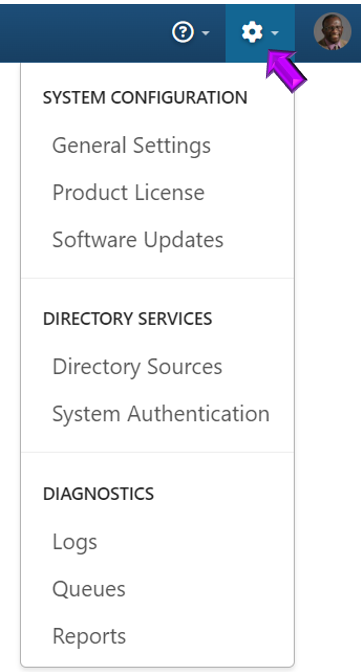
To open the System Configuration area, select the cogwheel in the top right corner within Permission Assist (see picture below) and pick an option from the list.
In this section
| Topic | Description |
|---|---|
| System authentication | Manage security groups, user assignments, SSO, and login attempts |
| Directory services | View and manage directory sources for importing identities |
| Directory source detail | View tabs and settings for a specific directory source |
| Add or edit a directory source | Create a new directory source or modify an existing one |
| Manually sync a directory source | Trigger a manual sync of identity data |
| Archive a directory source | Archive a directory source that is no longer needed |
| Restore a directory source | Restore an archived directory source |
| Delete a directory source | Permanently delete an archived directory source |
| Identities | View and manage identities within System Configuration |
| Product license | View your current Permission Assist license details and update your license key |
| General settings | Configure general system-wide settings |
| Taskboards | Overview of review, access request, and personnel event taskboard settings |
| Taskboards - Reviews | Configure review taskboard workflow settings |
| Taskboards - Access requests | Configure access request taskboard workflow settings |
| Taskboards - Personnel events | Configure personnel event taskboard workflow settings |
| Applications | Manage application connectors within System Configuration |
| Add or update a connector | Install or update an application connector |
| Software updates | View available software updates and download upgrade files |
| Enable software update notifications | Select notifications for new Permission Assist versions |
| Download upgrade files | Download the latest upgrade files |
| Diagnostics | View system diagnostic information |
| System connectivity | View and test the connection status of application connectors, directory source connectors, and platform services |
| Export diagnostics | Export diagnostic data for troubleshooting |
| Application logs | View application log entries |
| Queues | View and manage background processing queues |
| Reports | Configure report settings within System Configuration |
| Change the recovery password | Update the system recovery password |
| Log in using the recovery password | Access Permission Assist using the recovery password |