Architecture overview
Permission Assist is made up of three components that work together: a database, a web application, and a service. The service must be running for Permission Assist to function correctly. Refer to the Hardware and software requirements for detailed information about what's needed for each component.
Architecture diagram
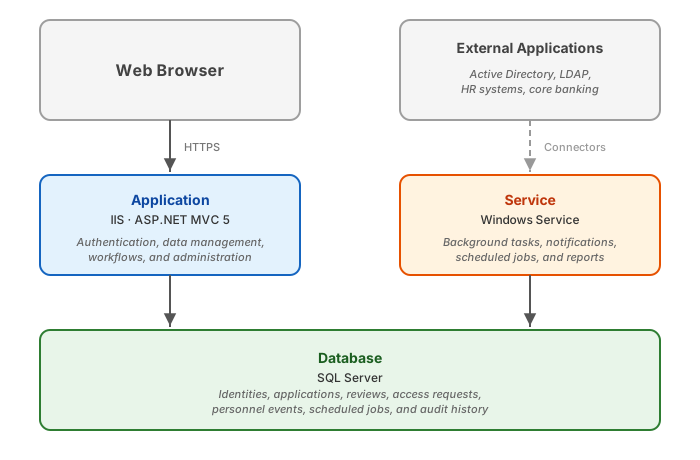
The database
The database is a SQL Server instance that stores all Permission Assist data, including identities, applications, user accounts, privileges, reviews, access requests, personnel events, scheduled jobs, and audit history.
Both the application and the service connect to this same database. When a user performs an action in the application that requires background processing (such as building a review or sending an email notification), the application writes a request to the database and the service picks it up and processes it.
The application
The application is an ASP.NET MVC 5 web application hosted in Internet Information Services (IIS). This is the interface that administrators, reviewers, provision engineers, and other users interact with.
The application handles:
- Authentication — login via Windows Authentication or Single Sign-On (SSO)
- Data management — importing application security data, managing identities, and configuring connectors
- Workflows — creating and managing reviews, access requests, and personnel events
- Administration — system configuration, diagnostics, and reporting
The service
The service is a Windows Service that runs continuously in the background. It handles all of the processing that happens behind the scenes, such as building reviews, sending email notifications, running scheduled imports, and generating reports.
| What it does | Examples |
|---|---|
| Processes background tasks | Building reviews, executing imports |
| Sends notifications | Queued email notifications |
| Runs scheduled jobs | Automatic application and directory source imports |
| Generates reports | Queued report requests |
| Performs maintenance | Health checks, cleanup of expired records |
The service is configured for automatic startup with failure recovery — if it stops unexpectedly, Windows restarts it automatically with a delayed timing.
Warning
The service must be running for Permission Assist to function correctly. Without it, reviews cannot be built, email notifications will not be sent, scheduled imports will not run, and reports will not be generated.
Common deployment topologies
The three components can be deployed on any combination of servers. These are the two most common configurations.
Single server
All three components run on the same machine. This is the simplest configuration and is common for smaller institutions.
graph TB
    subgraph server ["Single Server"]
        IIS["Application<br><i>IIS</i>"]
        WinSvc["Service<br><i>Windows Service</i>"]
        SQL["Database<br><i>SQL Server</i>"]

        IIS --> SQL
        WinSvc --> SQL
    end

    classDef app_style fill:#e3f2fd,stroke:#1565C0,color:#000
    classDef svc_style fill:#fff3e0,stroke:#E65100,color:#000
    classDef db_style fill:#e8f5e9,stroke:#2E7D32,color:#000

    class IIS app_style
    class WinSvc svc_style
    class SQL db_style
Split deployment
The application and service run on one server, while the database runs on a dedicated SQL Server. This is common for institutions that maintain a shared database server or require separation for performance or security.
graph TB
    subgraph appserver ["Application Server"]
        IIS["Application<br><i>IIS</i>"]
        WinSvc["Service<br><i>Windows Service</i>"]
    end

    subgraph dbserver ["Database Server"]
        SQL["Database<br><i>SQL Server</i>"]
    end

    IIS -->|"SQL connection"| SQL
    WinSvc -->|"SQL connection"| SQL

    classDef app_style fill:#e3f2fd,stroke:#1565C0,color:#000
    classDef svc_style fill:#fff3e0,stroke:#E65100,color:#000
    classDef db_style fill:#e8f5e9,stroke:#2E7D32,color:#000

    class IIS app_style
    class WinSvc svc_style
    class SQL db_style
Tip
Regardless of the deployment topology, all three components must be configured with the same database connection string. See Install Permission Assist for step-by-step setup instructions.