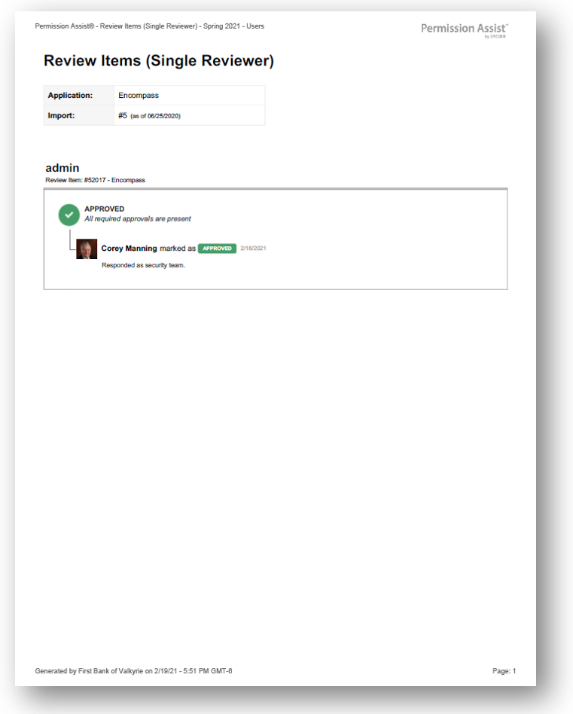
Single Reviewer Items report
How to view or generate this report
Go to Reports > Reviews > Single Reviewer.
The Single Reviewer Items report lists every approved review item that received exactly one reviewer response. Some items will legitimately have only one possible reviewer — for example, a small application with a single Application Manager — but for many items, the expectation is that two or more reviewers weighed in. This report makes the items with thinner review coverage visible.
Auto-approved items are excluded — this report is specifically about items a human reviewer touched.
When to use this report
- Review-depth audit. Confirm that high-risk items received the level of human scrutiny expected by your policy.
- Reviewer-coverage tuning. If many items keep showing up here for the same application, the application's reviewer roster or routing may need adjustment.
- Compliance evidence. Demonstrate that single-reviewer items were appropriate for that level of review (for example, all from small low-risk applications).
What this report includes
Every review item in the selected review that meets all three of:
- The overall status is Approved.
- The item was not auto-approved.
- Exactly one reviewer response exists on the item.
Output formats
The report is exported from the Reports section of an open or completed review. Five export options are available:
| Format | Mode | Best for |
|---|---|---|
| Excel | Summary | A compact spreadsheet listing every single-reviewer item, one row each. |
| Excel | Details | A spreadsheet with a full block per item, including the action history. |
| Excel | Flat | A single flat table with one row per action. |
| Summary | A printable summary grouped by application. | |
| Details | A printable, per-item PDF with each item's full action history. |
Section structure and columns
The output structure, modes, and column layouts are identical to the All Review Items report — the only difference is the filter (this report shows only approved items reviewed by exactly one reviewer). See that page's Excel — Summary, Excel — Details, Excel — Flat, PDF — Summary, and PDF — Details sections for the full column reference.
Sample