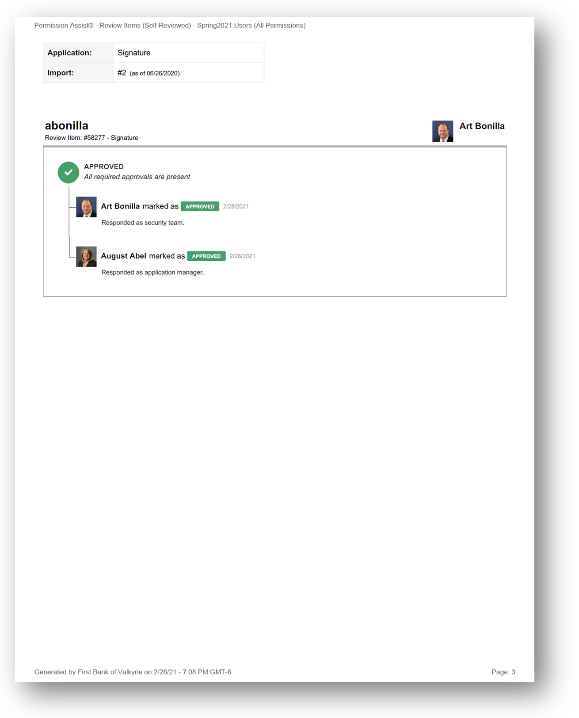
Self-Reviewed Items report
How to view or generate this report
Go to Reports > Reviews > Self Reviewed.
The Self-Reviewed Items report surfaces every review item where the reviewer who approved it is the same person whose access was being reviewed. In a healthy review process this should be empty — but when it isn't, the report makes the conflict visible so the Security Team can investigate or remediate.
Permission Assist's standard review routing is designed to prevent self-review, but edge cases can still occur — for example, when an identity is both an Application Manager for an application and a user of that application, or when stand-in routing falls back to a person who happens to be the user being reviewed. This report is how those edge cases get caught.
When to use this report
- Conflict-of-interest audit. Self-review is a finding that examiners specifically look for. Running this report on every completed review gives you a clean answer in advance.
- Review routing health check. A non-empty result is a signal that review-routing rules or surrogate assignments need to be tightened.
- Sample-based audit defense. When an auditor samples review items and asks who approved them, having this report on hand pre-empts surprises.
What this report includes
Every review item where at least one Approved reviewer response was authored by the same identity matched to the review item itself. In plain terms: the user being reviewed approved their own access.
Output formats
The report is exported from the Reports section of an open or completed review. Five export options are available:
| Format | Mode | Best for |
|---|---|---|
| Excel | Summary | A compact spreadsheet listing every self-reviewed item, one row each. |
| Excel | Details | A spreadsheet with a full block per item, including the action history. |
| Excel | Flat | A single flat table with one row per action — useful for confirming the timing and authorship of each approval. |
| Summary | A printable summary grouped by application. | |
| Details | A printable, per-item PDF with each item's full action history. |
Section structure and columns
The output structure, modes, and column layouts are identical to the All Review Items report — the only difference is the filter (this report shows only items where the matched identity approved their own item). See that page's Excel — Summary, Excel — Details, Excel — Flat, PDF — Summary, and PDF — Details sections for the full column reference.
Sample