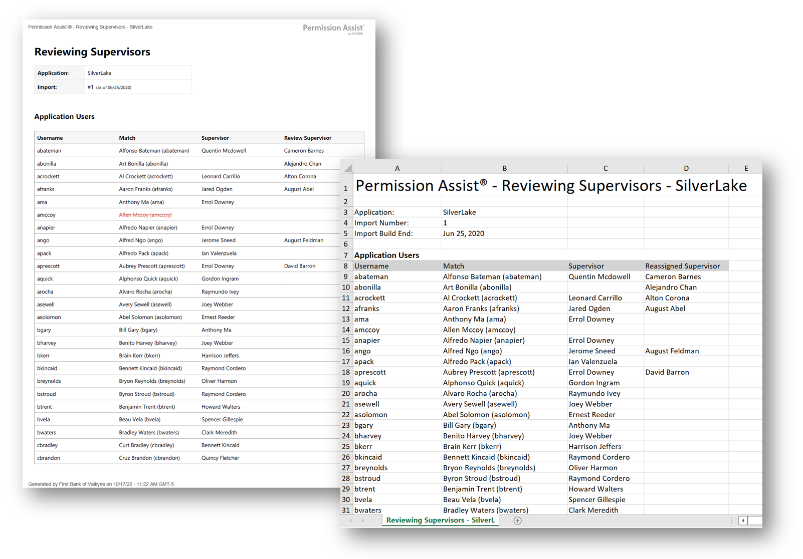
Reviewing Supervisors report
How to view or generate this report
Go to Reports > Applications > Reviewing Supervisors.
The Reviewing Supervisors report shows, for every user and every group in a selected application, who is responsible for reviewing them in a Supervisor review. By default, an application user's reviewer is the supervisor inherited from the directory source (the user's manager in Active Directory or whatever the connector reports). When a Security Team member reassigns the reviewer — to delegate review to someone other than the natural supervisor — the report shows both the original and the reassignment.
For groups, the report shows the supervisor who has been assigned to review each group. Groups don't have a "natural" supervisor the way individual users do, so this column reflects only explicit assignments.
When to use this report
- Review routing audit. Confirm that every user and every group has a reviewer who can act on it before opening a Supervisor review.
- Reassignment review. See, in one place, every place where the default supervisor chain has been overridden — useful for documenting why those exceptions exist.
- Coverage gaps. Blank reviewer columns flag users or groups that may not get reviewed at all unless coverage is added.
- Pre-review briefing. Hand this report to the Security Team or Application Manager so they know who they're routing review work to.
Output formats
| Format | Notes |
|---|---|
| Excel | A single sheet with two tables: Application Users and Application Groups. |
| A printable document with the same two sections. |
The header at the top of every export shows the application name, the import number, and the as-of date. The report covers every user and every group for the selected application — there is no search-term filter.
Sections
Application Users
Every application user, sorted by username.
| Column | Description |
|---|---|
| Username | The application username. |
| Match | The matched identity's long display name. Blank for ghost accounts. |
| Supervisor | The matched identity's supervisor as reported by the directory source. Blank if the matched identity has no supervisor, or for ghost accounts. |
| Reassigned Supervisor | The identity the Security Team explicitly assigned to review this user, if different from the directory-source supervisor. Blank when no reassignment exists. |
Application Groups
Every application group, sorted by name.
| Column | Description |
|---|---|
| Name | The group's name. |
| Nomenclature | The group's nomenclature (the source application's classification of the group, where provided). |
| Assigned Supervisor | The identity assigned to review this group, if any. Blank when no assignment exists. |
Sample