Detailed Export report
How to view or generate this report
Go to Reports > Access Models > Detailed Export.
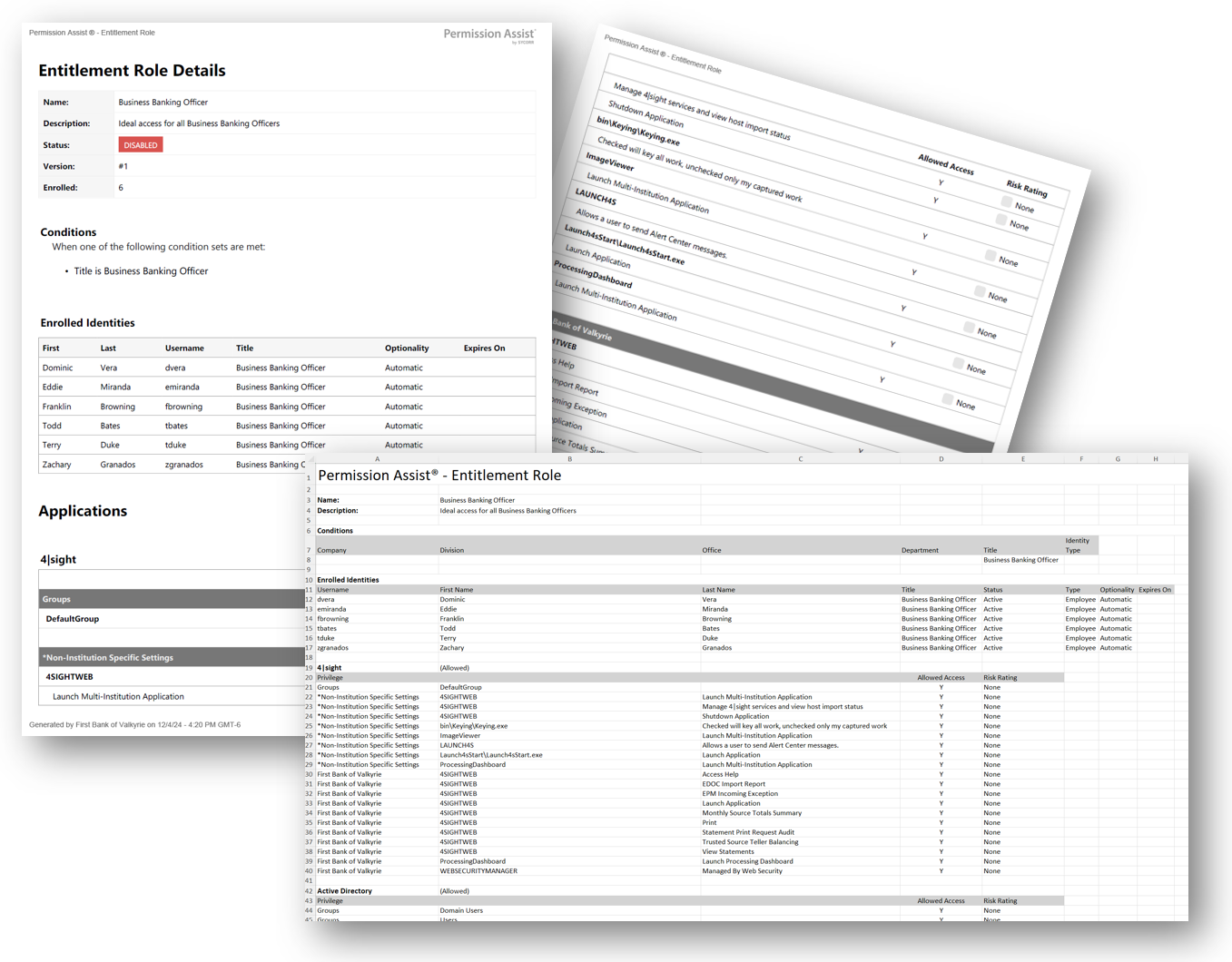
The Detailed Export report is the complete configuration snapshot of a single access model. It captures everything that defines the model: the model's name and description, the matching conditions that determine who it applies to, the identities currently enrolled in it (and how), and the per-application privilege definition for every application the model touches — including applications the model denies access to.
Use it as the authoritative reference for an access model: the document you share when an Application Manager, Access Model Owner, or auditor needs to understand exactly what the model does and who is enrolled.
When to use this report
- Access model audit. When an examiner asks how an access model is defined and who it applies to, this report is the direct answer.
- Pre-change review. Before editing an access model, run the Detailed Export to capture the current state — a baseline to compare against after the change.
- Cross-team review. When the Security Team and an Application Manager are aligning on what access a role should have, this export is the common artifact to mark up.
- New-hire orientation. For a new Access Model Owner, the report gives them the full picture of every model they own without having to navigate the UI section by section.
Output formats
| Format | Notes |
|---|---|
| Excel | A single sheet with the model header followed by the Conditions, Enrolled Identities, and per-application Privileges sections. |
| A printable document with the same sections. |
Sections
Access model header
| Field | Description |
|---|---|
| Name | The access model's name. |
| Description | The access model's description, if any. |
Conditions
The matching criteria that determine which identities the access model applies to. Each column lists every condition value of that type, comma-separated.
| Column | Description |
|---|---|
| Company | Companies the access model applies to. |
| Division | Divisions the access model applies to. |
| Office | Offices the access model applies to. |
| Department | Departments the access model applies to. |
| Title | Job titles the access model applies to. |
| Identity Type | Identity types the access model applies to (Employee, Service Account, Vendor, Shared, Mailbox, Client, Temporary, Administrator, Auditor, or AI Agent). |
A condition column is blank when the access model places no constraint on that dimension.
Enrolled Identities
Every identity currently enrolled in the access model, sorted by username. Identities matched by multiple enrollments (for example, the same person in more than one directory source) appear once in the list, de-duplicated by directory identifier.
| Column | Description |
|---|---|
| Username | The identity's username. |
| First Name | The identity's first name. |
| Last Name | The identity's last name. |
| Title | The identity's job title. |
| Status | Active, DISABLED, or REMOVED. |
| Type | The identity type. |
| Optionality | Required (the access model declares the identity must be enrolled) or Optional (the enrollment was added discretionarily). |
| Expires On | The date and time the enrollment expires. Blank when the enrollment does not expire. |
Privileges (one section per application)
For every application the access model touches, a privileges section appears with the application name as the section header. The header is marked (Allowed) when the access model grants access to the application, or (DENIED) when the access model explicitly denies it.
| Column | Description |
|---|---|
| Privilege | The privilege path's top-level header. Multi-level paths span this column and the two following label-less columns. |
| (Role) | The role portion of the privilege path. |
| (Privilege) | The leaf privilege portion of the path. |
| Allowed Access | Y if the access model grants this privilege, N if it explicitly denies it. |
| Risk Rating | The privilege's risk rating: None, Low, Moderate, High, or Critical. Defaults to None when no rating is set on the underlying core privilege. |
When the access model denies an application outright and defines no per-privilege entries, the privileges table shows a single row reading "All privileges are denied for this application."
Sample