Reviewed Applications report
How to view or generate this report
Go to Reports > Reviews > Reviewed Applications.
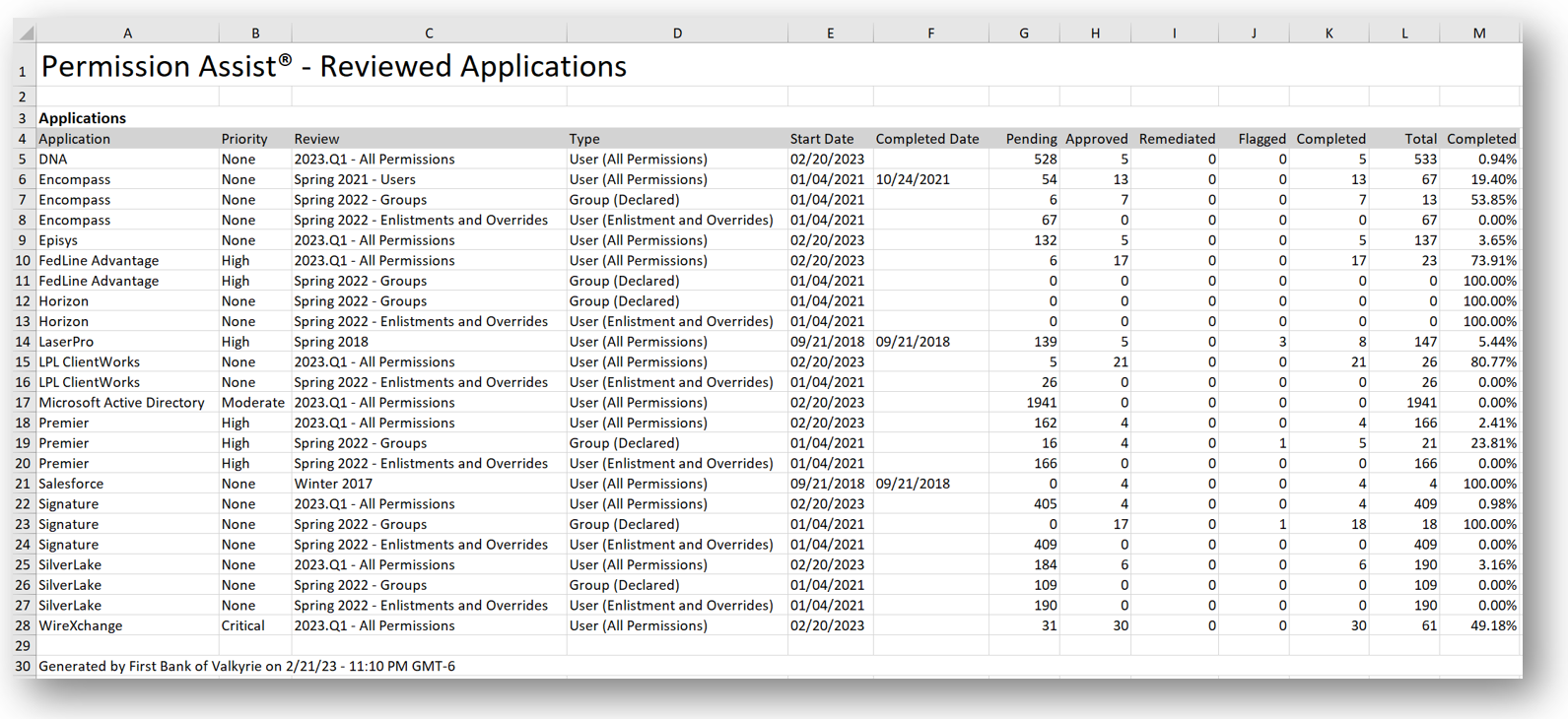
The Reviewed Applications report is the cross-review analytical view. Instead of looking at one review in depth, this report rolls up the item-count breakdown for every application across either the most recent review of each type or the full history of reviews, so you can see how an application's review activity is trending over time.
The report is Excel-only — it's designed for sorting, filtering, and charting in a spreadsheet rather than printing.
When to use this report
- Trend reporting. Track whether an application's flagged or remediated item counts are improving review-over-review.
- Management metrics. Build executive-friendly charts from the spreadsheet showing review completion percentages by application.
- Application risk picture. Compare items per priority across applications to see where the review burden is concentrated.
- Annual reporting. Use the "All History" view to assemble a year-end overview of all review activity across the organization.
Modes
| Mode | What it includes |
|---|---|
| Last Reviewed | For every application, the most recent Open or Completed review of each review type (one row per review type per application). |
| All History | For every application, every Open or Completed review the application has been part of (one row per review per application). |
The report can also be filtered to a single application; when filtered, the document title and file name reflect the application name.
Output format
| Format | Notes |
|---|---|
| Excel | A single-sheet spreadsheet with one Applications table. |
This report runs asynchronously. When it's ready, a notification indicator appears next to the Reports menu.
Columns
| Column | Description |
|---|---|
| Application | The application name. |
| Priority | The application's importance rating: None, Low, Moderate, High, or Critical. |
| Review | The review's name. |
| Type | The review's type: User (All Permissions), User (Enlistment and Overrides), or Group (Declared). |
| Start Date | The date the review was opened. |
| Completed Date | The date the review was closed, if it has been closed. |
| Pending | The count of pending review items in the review for this application. |
| Approved | The count of approved review items. |
| Remediated | The count of remediated review items. |
| Flagged | The count of currently flagged review items. |
| Completed | Approved + Remediated + Flagged (everything except Pending). |
| Total | The total count of review items in this review for this application. |
| Completed % | The percentage of the application's review items that are no longer pending. |
Sample