Identity Representation report
How to view or generate this report
Go to Reports > Applications > Identity Representation.
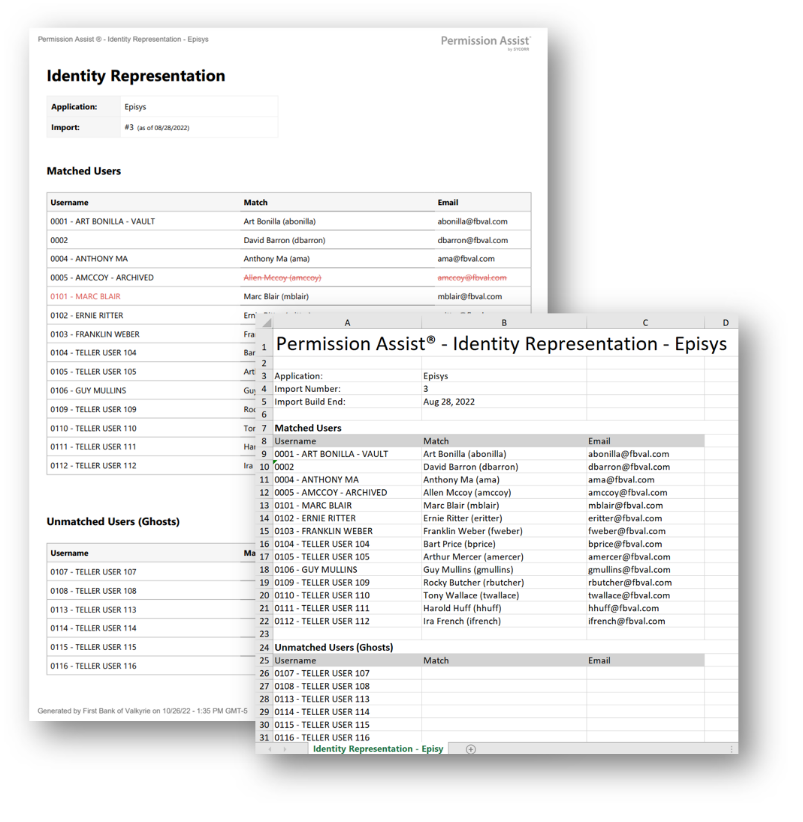
The Identity Representation report tells you who is — and who isn't — represented in a selected application. Instead of one list, the report packages three complementary views:
- Matched Users — application accounts that successfully matched to an identity.
- Unmatched Users (Ghosts) — application accounts with no matched identity, the same population as the Ghost Accounts report, shown here in shorter form.
- Unmatched Identities — active identities that have no application account, useful for spotting people who should plausibly have access but don't.
Each section includes the matched identity's email address (when available), making the report a quick reference when you need to email someone about their access posture in the application.
When to use this report
- Coverage check. Confirm that everyone who should have an account in the application does, and that every account is matched to someone.
- Application onboarding. When standing up a new application or migrating one, this report surfaces the gaps on both sides of the matching process.
- Compliance evidence. Examiners sometimes ask "Who has access to this application?" expecting both account-level and identity-level answers. This report covers both at once.
- Communication prep. The Email column makes it easy to compile a contact list for one of the three populations.
Output formats
| Format | Notes |
|---|---|
| Excel | A single sheet with three tables. |
| A printable document with the same three sections. |
The report covers every account and identity for the selected application — there is no search-term filter. The header at the top of every export shows the application name, import number, and as-of date.
Sections
Matched Users
Application users with a matched identity, sorted by username.
| Column | Description |
|---|---|
| Username | The application username. |
| Match | The matched identity's long display name. |
| The matched identity's email address, if known. |
Unmatched Users (Ghosts)
Application users with no matched identity, sorted by username.
| Column | Description |
|---|---|
| Username | The application username. |
| Match | Blank (these accounts have no matched identity). |
| Blank (no identity, no email). |
Unmatched Identities
Active identities that have no application account in the selected application, sorted by display name.
| Column | Description |
|---|---|
| Username | Blank (these are identities without an application account). |
| Match | The identity's long display name. |
| The identity's email address, if known. |
Sample