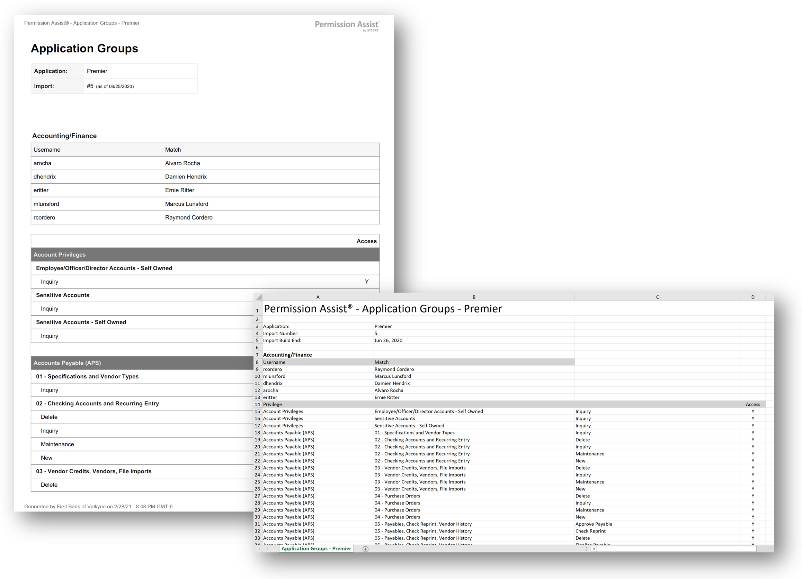
Application Groups report
How to view or generate this report
Go to Reports > Applications > Application Groups.
The Application Groups report inventories the security groups in a selected application. Two modes shape what the report shows:
- Summary lists every group with its name and description, one row per group. Use this when you need a clean inventory.
- Details expands each group with the users currently enlisted in it and the privileges the group itself grants. Use this when you're auditing role-based access at the group level.
The data behind the report comes from the most recent finished import for the application; the import number and as-of date are shown in the report header.
When to use this report
- Group inventory. Use Summary when you need a list of every group in an application — for migration planning, compliance documentation, or routine review.
- Group-based access audit. Use Details to see, group by group, who is enlisted and which privileges the group conveys — the right view when an Application Manager asks "who's in this group and what does it give them?"
- Role-design review. When tightening up role-based access in an application, the Details view shows you whether each group's membership and privileges still match its intended purpose.
- Pre-review prep. Reviewers benefit from understanding the groups before opening a review. Either mode supports that briefing.
Output formats
The report is exported from an application's Reports section. Four export options are available:
| Format | Mode | Best for |
|---|---|---|
| Excel | Summary | A compact spreadsheet of every group, one row each. |
| Excel | Details | A per-group spreadsheet with each group's users and privileges. |
| Summary | A printable summary, one row per group. | |
| Details | A printable per-group document. |
Filter
| Option | Effect |
|---|---|
| Search Term | Narrows the report to groups whose name contains the term. |
Sections
Every export starts with an Application header showing the application name, the import number, and the as-of date.
Excel — Summary
One row per group, sorted by name.
| Column | Description |
|---|---|
| Name | The group's name. |
| Description | The group's description, if any. |
Excel — Details
One section per group. Each section contains a group header (name and description) followed by two tables.
Users (per group)
The users currently enlisted in the group.
| Column | Description |
|---|---|
| Username | The application username. |
| Match | The matched identity's short display name, if any. Blank for ghost accounts. |
Privileges (per group)
The privileges the group itself conveys to its members.
| Column | Description |
|---|---|
| Privilege | The privilege the group grants. Multi-level privilege paths span this column and the two following label-less columns. |
| (Role) | The role portion of the privilege path. |
| (Privilege) | The leaf privilege portion of the path. |
| Access | Y if the group grants the privilege, N if it explicitly denies it, blank if unspecified. |
If a group has no privileges, the privileges table shows a single row with "No privileges found."
PDF — Summary
A printable, one-row-per-group summary.
PDF — Details
A printable, per-group document with each group's users and privileges.
Sample