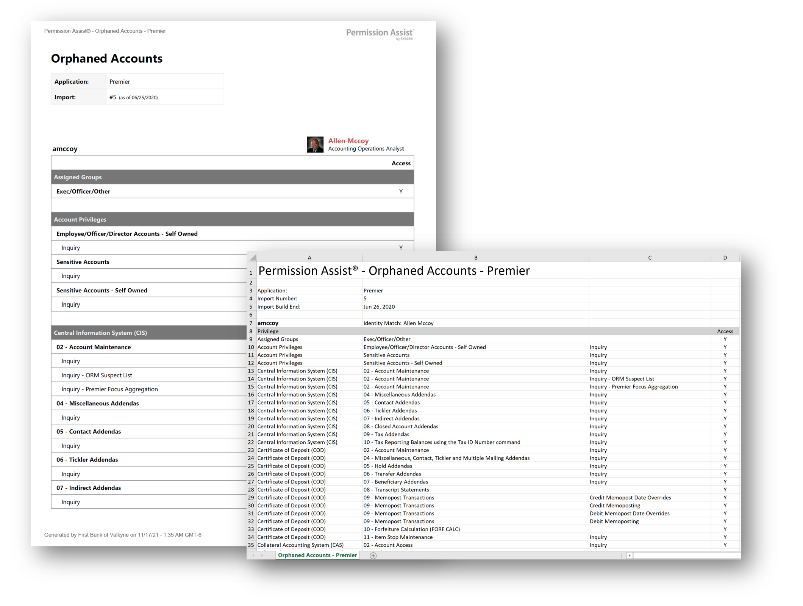
Orphaned Accounts report
How to view or generate this report
Go to Reports > Applications > Orphaned Accounts.
The Orphaned Accounts report lists every application user account whose matched identity is no longer active — either the identity is disabled or the identity has been removed from Permission Assist entirely. These are the accounts most likely to need cleanup: the person they belong to has left, changed roles, or otherwise been deactivated, and yet the application account is still there.
The report shares its column layout with the Application Users report — the only difference is the filter. The Summary and Details modes are identical in structure.
When to use this report
- Departure-cleanup verification. After someone leaves the organization and their identity is disabled, this report shows whether their application accounts were caught by the offboarding process.
- Routine access hygiene. A periodic sweep of every application's orphaned accounts catches access that survived role transitions, system migrations, or one-off provisioning.
- Audit response. Examiners ask whether deactivated users still have application access. This report is the direct answer.
What this report includes
Every application user where the matched identity exists and is not active (disabled, removed, or otherwise deactivated). Accounts without a matched identity at all are excluded — those are Ghost Accounts instead.
Output formats
The report is exported from an application's Reports section. Four export options are available:
| Format | Mode | Best for |
|---|---|---|
| Excel | Summary | A compact spreadsheet of every orphaned account, one row each. |
| Excel | Details | A per-account spreadsheet with the account info and full privilege list — useful when planning the cleanup. |
| Summary | A printable summary, one row per account. | |
| Details | A printable per-account document. |
Filter
| Option | Effect |
|---|---|
| Search Term | Narrows the report to accounts whose username or matched identity name contains the term. |
Section structure and columns
The output structure and column layouts are identical to the Application Users report — the only difference is the filter (this report shows only accounts whose matched identity is not active). See that page's Excel — Summary and Excel — Details sections for the full column reference.
In the Matched Status column, every row reads DISABLED or REMOVED by definition — accounts with an Active matched identity are not in this report.
Sample