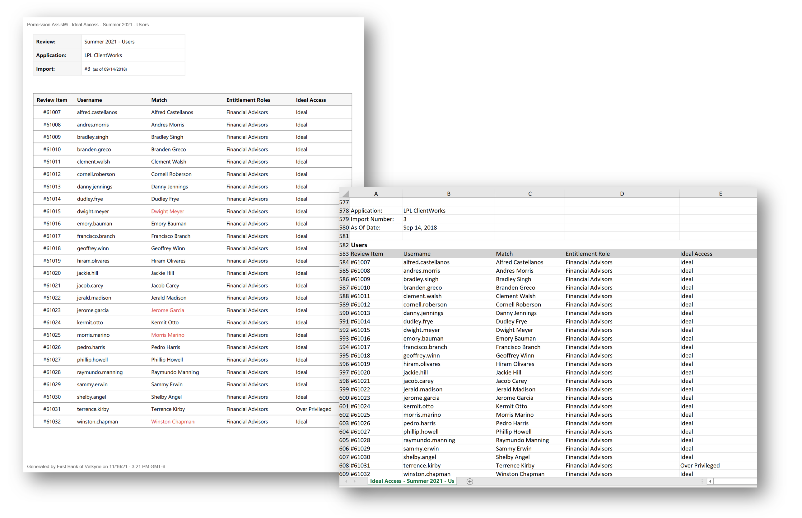
Ideal Access report
How to view or generate this report
Go to Reports > Reviews > Ideal Access.
The Ideal Access report shows, for every review item in a review, how the user's actual access measures up against the ideal access defined for them by their assigned access models. Where the All Review Items report gives you a simple Yes/No on whether access is ideal, this report breaks that judgment into four values — telling you not only that access deviates from ideal, but in which direction and whether the deviation has already been accepted.
The report covers every application in the review (separation rules are excluded — ideal access is an application-level concept, not an SoD one).
When to use this report
- Access-model accuracy check. A high count of "Over Privileged" findings often means the access model itself needs to be tightened. A high count of "Accepted (Under Privileged)" findings can mean either an over-tight model or genuinely under-provisioned users — either way, worth investigating.
- Remediation prioritization. "Over Privileged" items are the ones with active risk exposure. Use this report to find them quickly and decide which to remediate this review cycle.
- Reviewer briefing. Hand this report to Application Managers ahead of a review so they know which of their users are perfectly aligned with the model versus which are outliers needing extra attention.
- Access-model rollout follow-through. After enrolling identities in a new access model, this report shows where the rollout has landed cleanly and where exceptions remain.
Output formats
| Format | Notes |
|---|---|
| Excel | Multi-section spreadsheet with one section per application. |
| A printable, per-application document with the same per-user breakdown. |
Sections
The Excel version contains one section per application in the review. Each section starts with an application header (Application name, Import Number, As Of Date) followed by a users table.
Users table (Excel)
| Column | Description |
|---|---|
| Review Item | The review item's short identifier. |
| Username | The application username. |
| Match | The matched identity's name, if any. Blank for orphaned or ghost accounts. |
| Access Model | The names of the access models the matched identity is enrolled in for this application. May list multiple access models comma-separated, or be blank if the identity is not enrolled in any. |
| Ideal Access | One of four values (see below). Blank when the identity is not enrolled in any access model — there is no ideal access to compare against. |
Ideal Access values
| Value | Meaning |
|---|---|
| Ideal | The user's access matches the ideal access defined by their access models — every position the model takes (should-have and should-not-have) is satisfied. |
| Accepted (Over Privileged) | The user has access beyond what the access model defines, and that overage was previously accepted (typically by a reviewer who added a justification). |
| Accepted (Under Privileged) | The user is missing access the access model says they should have, and that gap was previously accepted (typically by a reviewer who added a justification). The shortfall is acknowledged but is not a remediation candidate this cycle. |
| Over Privileged | The user has access beyond what the access model defines and the overage has not been accepted — this is the value that warrants remediation. |
The PDF presents the same data per application in a printable layout.
Sample