All Review Items report
How to view or generate this report
Go to Reports > Reviews > All Review Items.
The All Review Items report is the comprehensive record of a single review. It lists every review item the review contains — for every application and every separation rule in scope — along with each item's overall status, ideal-access result, and the chronological history of comments and actions taken on it.
Unlike the focused review reports (Flagged, Remediated, Has Comments, Self-Reviewed, Single Reviewer, Stand-in Reviewers, Separation Rule Violations), this report is not filtered to a specific status or condition. It includes pending items, approved items, flagged items, and remediated items — together, in one document. Action history is included for every item, not only those that were flagged or remediated.
When to use this report
- Full-review audit artifact. When an auditor or examiner asks for the complete record of a review, this is the report that has everything in one document.
- Internal review of how a review went. Use the Summary mode to see, at a glance, the spread of statuses across applications; use the Details mode to drill into individual items with their full action timeline.
- Hand-off documentation. When the Security Team closes a review and needs to archive a single, self-contained artifact that captures both the outcome and the reasoning behind every decision.
- Custom analysis in Excel. Use the Flat mode to pull the entire review's action history into a single table, then sort, filter, or pivot in Excel to answer questions the standard reports do not directly address.
For more targeted reports — for example, only flagged items, or only items where the reviewer reviewed their own access — see the other review reports.
Output formats
The report is exported from the Reports section of an open or completed review. Five export options are available:
| Format | Mode | Best for |
|---|---|---|
| Excel | Summary | A compact spreadsheet listing every item, one row each. |
| Excel | Details | A spreadsheet with a full block per item, including the action history. |
| Excel | Flat | A single flat table with one row per action, suitable for filtering or pivoting. |
| Summary | A printable summary grouped by application, one row per item. | |
| Details | A printable, per-item PDF with each item's full action history. |
Items are grouped by application (or by separation rule). Inside each group, items are sorted by name.
Excel — Summary
One row per review item. Use this mode for a compact spreadsheet view of the entire review.
| Column | Description |
|---|---|
| Review Item # | The review item's short identifier (the number shown in the application). |
| Application | The application the item belongs to, or the separation rule if the item came from a separation rule. |
| Name | The application username (or the separation rule key) for the item. |
| Type | The account type of the matched application user, such as Standard, Service, or Shared. |
| Matched Identity | The name of the identity the application user is matched to, if any. Blank for orphaned or ghost accounts. |
| Overall Status | The item's current status: Pending, Approved, Flagged, or Remediated. |
| Created On | The date the review item was created (the date the review compiled it from imported data). |
Excel — Details
A multi-section spreadsheet with one block per review item. Each block contains the item's header information followed by the chronological action history for that item.
Item header (one block per review item)
| Field | Description |
|---|---|
| Review Item | The review item's short identifier. |
| Application or Separation Rule | The application the item belongs to, or — for separation-rule items — the rule name. |
| Username | The application username (or separation rule key). |
| Type | The account type of the matched application user. |
| Matched Identity | The matched identity name, if any. |
| Ideal Access | Yes, No, or Unknown. Yes means the user's actual access matches every position the access model takes — no excess privileges where the model says they shouldn't have them, and no missing privileges where the model says they should. No means the user's access diverges from the access model in some way — whether the deviation was previously accepted (in either direction) or remains flagged for remediation. Unknown means the item has no privilege data available to compare. For the fuller four-value breakdown (Ideal, Accepted (Over Privileged), Accepted (Under Privileged), Over Privileged), see the Ideal Access report. |
| Overall Status | Pending, Approved, Flagged, or Remediated. |
Action history (table beneath each item header)
| Column | Description |
|---|---|
| Action | The action taken — for example, Created, Approved, Flagged, Comment. |
| Occurred On | The date and time the action took place, shown in your organization's configured time zone. |
| Actor | The name of the identity who took the action, or Permission Assist for system-generated entries. |
| Info | The comment text, log message, or other detail captured with the action. |
The first entry in each item's action history is always its Created entry, marking when the review item was compiled into the review.
Excel — Flat
A single, flat table — one row per action across every review item in the review. Each row repeats the item's identifying information so the table can be filtered, sorted, or pivoted independently of any structural grouping.
| Column | Description |
|---|---|
| Review Item # | The review item's short identifier. |
| Application | The application or separation rule name. |
| Name | The application username (or separation rule key). |
| Type | The account type of the matched application user. |
| Matched Identity | The matched identity name, if any. |
| Ideal Access | Yes, No, or Unknown — see the description in the Details section above. |
| Overall Status | Pending, Approved, Flagged, or Remediated. |
| Action | The action taken — for example, Created, Approved, Flagged, Comment. |
| Occurred On | The date and time the action took place. |
| Actor | The name of the identity who took the action. |
| Acting As | The role under which the actor was eligible to act on this item — for example, Supervisor, Application Manager, Security Team. Useful for audit when an identity reviews items under multiple roles. |
| Info | The comment text or log message captured with the action. |
PDF — Summary
A printable summary grouped by application. For each application or separation rule in the review, the summary shows the same fields as the Excel Summary mode (Review Item #, Name, Type, Matched Identity, Overall Status, Created On).
PDF — Details
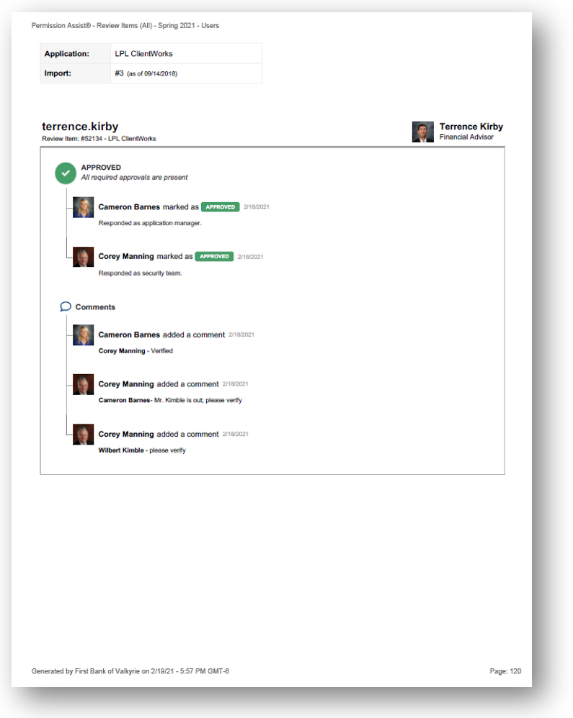
A printable per-item PDF. For each review item, the PDF shows the item header (the same fields as the Excel Details header) followed by the chronological action history. When profile images are enabled in General Settings, actor avatars are shown alongside each action.
Sample