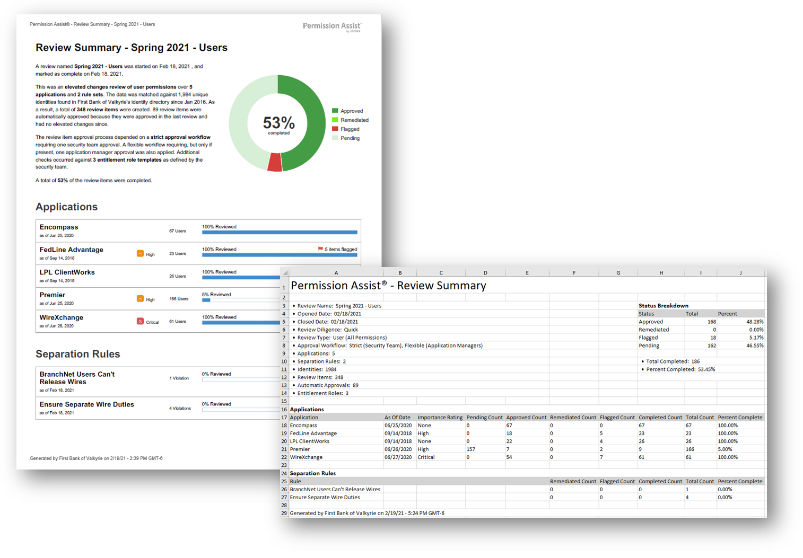
Overview Summary report
How to view or generate this report
Go to Reports > Reviews > Overview Summary.
The Overview Summary report is the single-page snapshot of a review. It captures the review's identifying information, the statistics that tell you whether it's on track or done, the approval workflow that was in effect, and a per-application breakdown of how many items are pending, approved, flagged, or remediated. Use it as the cover sheet for an audit package, the status update for a Security Team meeting, or the high-level scorecard while a review is in flight.
The report is available in PDF or Excel; both contain the same data, organized in slightly different ways for printing vs. spreadsheet analysis.
When to use this report
- Audit cover sheet. When you assemble an audit package, this report is the executive summary that goes on top — every section an examiner asks about at a high level is on one page.
- In-flight status check. Run this report mid-review to see which applications are dragging and where the work is concentrated.
- Completion verification. Before closing a review, confirm every application reads 100% complete and that flagged/remediated counts line up with the focused reports.
- Stakeholder communication. The statistics section is friendly enough to share with executives or non-technical stakeholders.
Output formats
| Format | Notes |
|---|---|
| Excel | Multi-section spreadsheet with statistics header, response requirements, applications, separation rules, and review-level comments. |
| A printable single-document summary of the same data. |
The report can be filtered to a single application by selecting one from the Reports panel before exporting — when filtered, all of the per-application sections are scoped to just that application.
Sections (Excel)
Statistics header
A header block listing the review's identifying information and totals.
| Field | Description |
|---|---|
| Review Name | The review's name. |
| Opened Date | The date the review was opened. |
| Closed Date | The date the review was completed, if it has been closed. |
| Completed By | The identity who closed the review, if any. |
| Review Type | The review type: User (All Permissions), User (Enlistment and Overrides), or Group (Declared). |
| Applications | The count of applications in the review. |
| Separation Rules | The count of separation rules in the review. |
| Identities | The total number of identities in Permission Assist (organization-wide, not review-scoped). |
| Review Items | The total number of review items in the review. |
| Automatic Approvals | The count of items the system auto-approved without a human reviewer response. |
| Access Models | The count of distinct access models referenced by the review's items. |
| Filter Rules | The count of filter rules in effect for this review type. |
Alongside the statistics, a Status Breakdown sub-table lists the count and percentage of items in each overall status (Approved, Remediated, Flagged, Pending) plus the total and percent completed.
Response Requirements
The approval workflow that was in effect for this review — which responder roles were expected to weigh in, on which items, and how many responses each role required.
| Column | Description |
|---|---|
| Type | The responder role — for example, Supervisor, Application Manager, Security Team. |
| Condition | When the requirement applies — "Always" or a conditional like "Application has priority Critical or higher" or "Contains privilege with risk rating High or higher." |
| Required | The requirement level: Required, Optional, or Not Required. |
| Number of Responses | The minimum number of responses required when the rule is in effect. |
Applications
A per-application breakdown of review activity.
| Column | Description |
|---|---|
| Application | The application name. |
| As Of Date | The point-in-time the application's data was captured for the review. |
| Importance Rating | The application's priority (None, Low, Moderate, High, Critical). |
| Pending | The count of pending review items. |
| Approved | The count of approved review items. |
| Remediated | The count of remediated review items. |
| Flagged | The count of currently flagged review items. |
| Completed | Approved + Remediated + Flagged (everything except Pending). |
| Total | The total count of review items for the application. |
| Completed % | The percentage of the application's items that are no longer pending. |
Separation Rules
A per-rule breakdown of separation-rule violations.
| Column | Description |
|---|---|
| Rule | The separation rule name. |
| Remediated | The count of remediated SoD items. |
| Flagged | The count of currently flagged SoD items. |
| Completed | Remediated + Flagged. |
| Total | The total count of SoD items for this rule. |
| Completed % | The percentage of the rule's items that are no longer pending. |
Comments (when present)
Review-level comments attached to the review itself (not to individual items).
| Column | Description |
|---|---|
| Occurred On | The date and time the comment was made. |
| Actor | The name of the identity who left the comment. |
| Info | The comment text. |
Sections (PDF)
The PDF version presents the same data as the Excel version in a printable layout, with the statistics header at the top, followed by the response requirements, applications, separation rules, and any review-level comments. When profile images are enabled in General Settings, commenter avatars are shown alongside each comment.
Sample