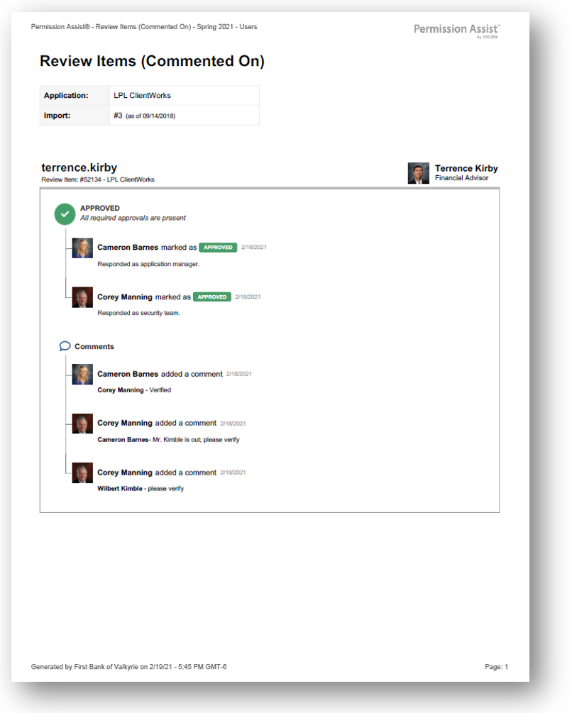
Has Comments Review Items report
How to view or generate this report
Go to Reports > Reviews > Has Comments.
The Has Comments Review Items report lists every review item that has at least one comment attached to it, regardless of the item's overall status. Comments capture the conversation around a review item — questions a reviewer raised, evidence collected, judgement calls explained — so this report is the fastest way to surface every item that has discussion attached.
Items in the report can be at any overall status: Pending, Approved, Flagged, or Remediated. The presence of a comment is the only filter.
When to use this report
- Audit narrative. Auditors often want to see why a decision was made, not just what was decided. The comments captured here are the narrative.
- Knowledge-transfer review. When a new Security Team member takes over an in-flight review, this report surfaces every item that already has context worth reading.
- Quality check. Confirm that comments accompany the items that warranted them — for example, items that were approved despite unusual circumstances.
What this report includes
Every review item in the selected review where at least one comment exists. The comment count itself is not shown; the report includes the full comment thread for each item.
Output formats
The report is exported from the Reports section of an open or completed review. Five export options are available:
| Format | Mode | Best for |
|---|---|---|
| Excel | Summary | A compact spreadsheet listing every commented item, one row each. |
| Excel | Details | A spreadsheet with a full block per item, including every comment in chronological order. |
| Excel | Flat | A single flat table with one row per comment or logged action. |
| Summary | A printable summary grouped by application, one row per item. | |
| Details | A printable, per-item PDF with each item's full comment thread. |
Section structure and columns
The output structure, modes, and column layouts are identical to the All Review Items report — the only difference is the filter (this report shows only items with at least one comment). See that page's Excel — Summary, Excel — Details, Excel — Flat, PDF — Summary, and PDF — Details sections for the full column reference.
Sample