Approved Enrollments report
How to view or generate this report
Go to Reports > Identities > Approved Enrollments.
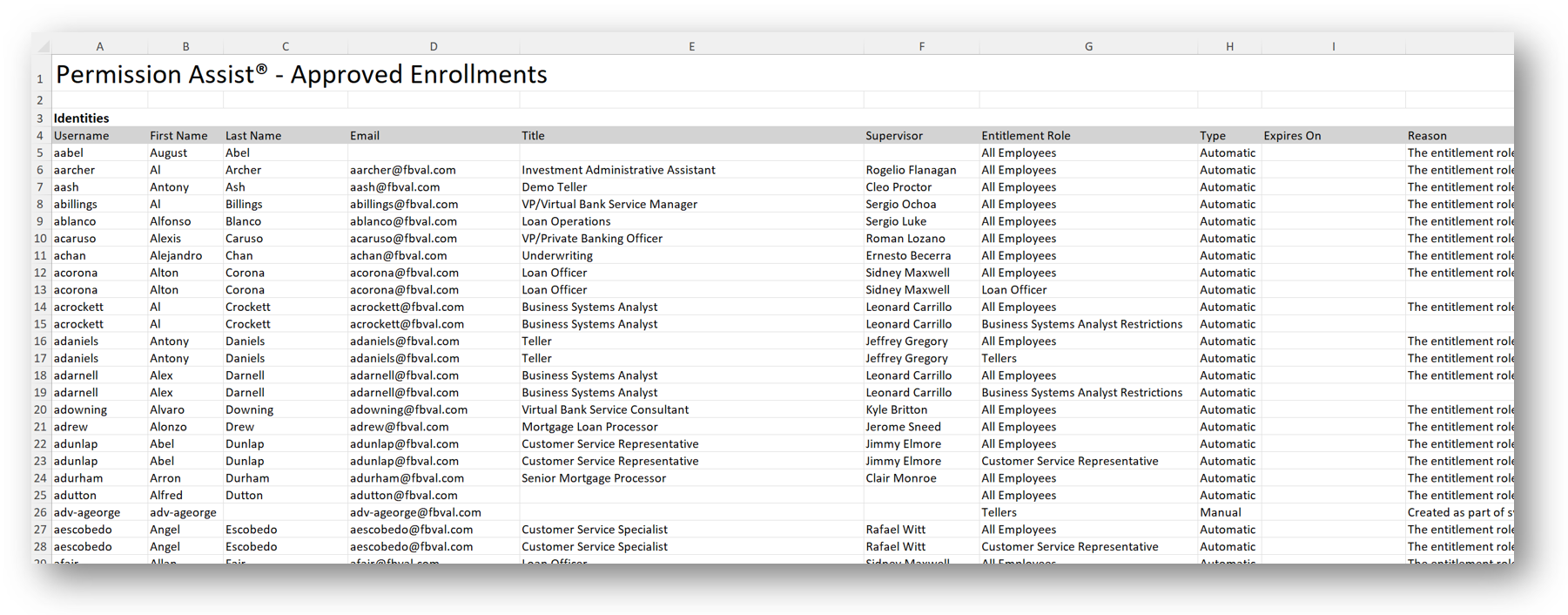
The Approved Enrollments report lists every active identity in Permission Assist and the access models each one is enrolled in. For every enrollment, the report shows whether the enrollment is required by the model or optional, when (if ever) it expires, and the reason the enrollment was created. Identities that aren't enrolled in any access model still appear in the report as a single row with the enrollment fields blank — so the roster is complete.
When to use this report
- Enrollment audit. When an examiner asks who is enrolled in a given access model and why, this report is the direct evidence.
- Expiration planning. Sort by Expires On in Excel to surface enrollments approaching their end date and plan renewals or removals.
- Coverage check. Spot identities with no enrollments who probably should be enrolled — and access models with thin coverage that should be expanded.
- Required-vs-optional posture. Filter the Excel by the Type column to separate enrollments the access model mandates from ones an Access Model Owner added by choice.
Output format
| Format | Notes |
|---|---|
| Excel | A single sheet with one Identities table covering every active identity. |
This report is Excel-only — there is no PDF version. It has no parameters or filters; it always covers every active identity.
Columns
The table is sorted by identity username, then by access model name within each identity.
| Column | Description |
|---|---|
| Username | The identity's username. |
| First Name | The identity's first name. |
| Last Name | The identity's last name. |
| The identity's email address. | |
| Title | The identity's job title. |
| Supervisor | The supervisor's name reported by the directory source. |
| Access Model | The name of the access model the identity is enrolled in. Blank when the identity has no enrollments. |
| Type | The enrollment's optionality: Required (the access model declares the identity must be enrolled) or Optional (the enrollment was added discretionarily). Blank when the identity has no enrollments. |
| Expires On | The date and time the enrollment expires, with the company-time GMT offset noted. Blank when the enrollment doesn't expire or the identity has no enrollments. |
| Reason | The reason text captured when the enrollment was created. Blank when the identity has no enrollments. |
Identities with multiple enrollments produce multiple rows — one row per (identity, enrollment) pair.
Sample