Last Login Date report (Applications)
How to view or generate this report
Go to Reports > Applications > Last Login Date.
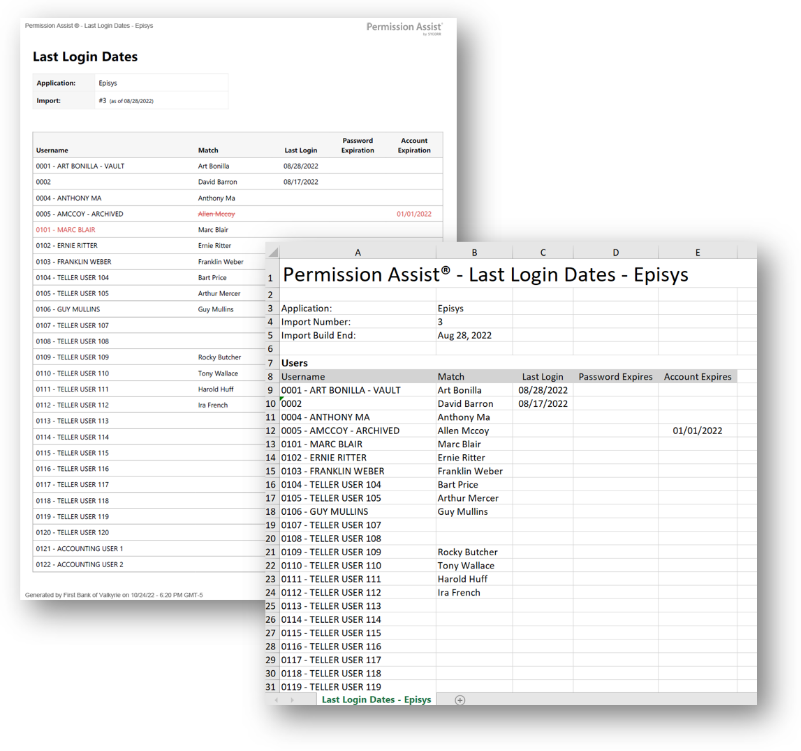
The Last Login Date report is a credential-hygiene snapshot of every user account in a selected application — when each account last logged in, when its password expires, and when the account itself expires. It's the focused version of the credential-hygiene columns in the Application Users report, without the matching, status, or metadata noise: just usernames, matched identities, and the three date fields that drive cleanup decisions.
This is the Applications-section version of the report. There is a separate Last Login Date report in the Reviews section that produces similar columns scoped to a specific review.
When to use this report
- Stale-account cleanup. Sort by Last Login ascending in Excel to surface accounts that haven't been used in months or years.
- Pre-expiration outreach. Filter by Password Expires or Account Expires within the next 30 days to plan reminders or proactive remediation.
- Configuration audit. Many accounts with blank expiration dates can signal that the source application isn't configured to require credential lifecycle management — worth investigating.
- Annual review prep. Run this report before opening an annual review so reviewers know which accounts are active versus dormant.
Output formats
| Format | Notes |
|---|---|
| Excel | A single sheet with one Users table. |
| A printable document with the same table. |
The report header shows the application name, the import number, and the as-of date. The Users table is sorted by username.
Filter
| Option | Effect |
|---|---|
| Search Term | Narrows the report to users whose username, first name, or last name contains the term. |
Columns
| Column | Description |
|---|---|
| Username | The application username. |
| Match | The matched identity's short display name. Blank for ghost accounts. |
| Last Login | The date of the user's most recent login to the application. Blank if the source application did not provide a value. |
| Password Expires | The date the user's password expires. Blank if the source application did not provide a value. |
| Account Expires | The date the user's account expires. Blank if the source application did not provide a value. |
Sample