Reviewed Privileges report
How to view or generate this report
Go to Reports > Identities > Reviewed Privileges.
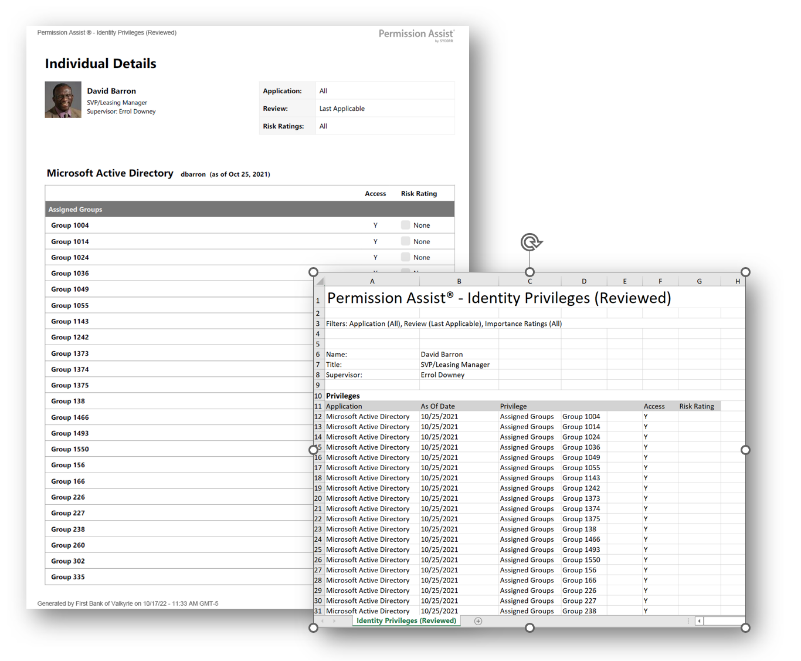
The Reviewed Privileges report (called Identity Privileges (Reviewed) in the report's own header) lists each identity along with the privileges they held at the time of their most recent applicable review, broken down by application. Unlike the Identity Details report, which reflects current import data, this report reflects review-time data — a frozen snapshot of access as it was reviewed.
When more than one review has covered an application for an identity, the report uses the most recent review item per application by default. You can also explicitly select a review to scope the report to a specific point in time.
When to use this report
- Audit trail for past access. When an examiner asks "What did this person have at the time of the last review?", this report shows it without being confused by changes that happened after.
- Comparison against current. Run this report alongside Identity Details to see what changed between the last review and today.
- Reconciliation. Verify that decisions made during a review still hold — has any flagged access been removed? Has any approved access been revoked unexpectedly?
- Historical research. When investigating an incident, the reviewed snapshot tells you what the organization understood about access at a specific point in time.
Output formats
| Format | Notes |
|---|---|
| Excel | A multi-section spreadsheet with one section per identity. |
| A printable, per-identity document with the same content. |
Filters
| Option | Effect |
|---|---|
| Search Term | Narrows the report to identities whose username, first name, last name, title, or supervisor name contains the term. |
| Review | Restricts the report to review items from a specific review. Defaults to Last Applicable — the most recent review for each application. |
| Application | Restricts the report to review items from a single application. |
| Identity | When the report is generated for a specific identity, only that identity is included. |
| Importance Ratings | Restricts the privileges shown to selected risk-rating tiers (None, Low, Moderate, High, Critical). |
A header at the top of the export shows the active filter values.
Sections (per identity)
Identity header
| Field | Description |
|---|---|
| Name | The identity's short display name. |
| Title | The identity's job title, if known. |
| Supervisor | The supervisor's name reported by the directory source, if known. |
Privileges table (one row per privilege)
| Column | Description |
|---|---|
| Application | The application name. |
| As Of Date | The date the review item was compiled — the snapshot date for this row. |
| Privilege | The privilege path's top-level header. Multi-level paths span this column and the two following label-less columns. |
| (Role) | The role portion of the privilege path. |
| (Privilege) | The leaf privilege portion of the path. |
| Access | Y if the identity held the privilege at review time, N if explicitly denied. |
| Risk Rating | The privilege's risk rating at review time: None, Low, Moderate, High, or Critical. Blank if no rating was set. |
When an identity was matched in more than one review item for the same application, the report uses the newest review item for that application.
Sample