Application Imports report
How to view or generate this report
Go to Reports > Reviews > Application Imports.
The Application Imports report packages the raw security-data import files that were used to build a review, together with a per-import summary PDF for each application and the review's Overview Summary at the top. The result is a single ZIP archive that captures exactly what data the review was built from — useful when an auditor wants to verify that the review's findings are grounded in real source data.
The report runs asynchronously: when the package is ready, a notification indicator appears next to the Reports menu. If the package isn't downloaded within 15 minutes, an email notification is sent.
When to use this report
- Source-data audit. When an examiner asks "Where did this access data come from?", the raw import files in this package are the answer.
- Data-quality verification. Cross-check the per-import summary PDFs against the application's expected user/group/privilege counts to confirm the import captured what it should have.
- Long-term archive. Pair this package with the Complete Audit Package to retain the full source-and-output bundle for the retention window your regulator requires.
Output format
A single ZIP archive.
ZIP contents
| Path | Description |
|---|---|
Review Summary.pdf |
The review's Overview Summary report in PDF form. |
Applications/<Application Name>/<Application Import Summary>.pdf |
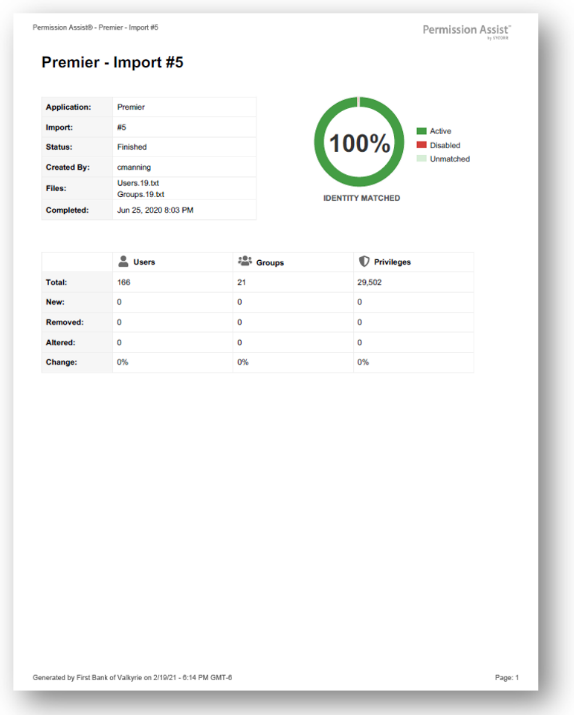
A per-application summary of the import that fed the review, including import number, status, user, file names, date/time, and change statistics for users, groups, and privileges. |
Applications/<Application Name>/Files/<filename> |
The raw, unmodified import file(s) that the application imported into Permission Assist. File names are preserved from the source upload. Collisions are de-duplicated with a (1), (2), ... prefix. |
Applications that have no associated application import (for example, separation rules, or historical reviews that pre-date the current data model) are skipped. The package contains one folder under Applications/ for each application that has importable source data.
Sample