Separation Rule Violations report
How to view or generate this report
Go to Reports > Reviews > Separation Rule Violations.
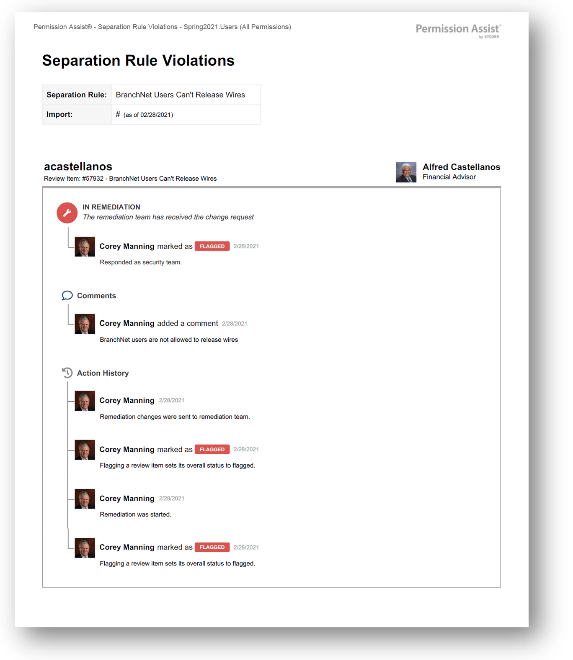
The Separation Rule Violations report lists every review item generated by a separation-of-duties (SoD) rule in the selected review. Separation rules identify incompatible combinations of privileges — for example, the same person having both "initiate wire transfer" and "approve wire transfer" — and surface those combinations as review items so the Security Team can confirm whether the conflict is acceptable, mitigated by compensating controls, or needs to be resolved.
Items in this report can be at any overall status: Pending, Approved (the conflict was accepted), Flagged, or Remediated.
When to use this report
- SoD audit. Auditors specifically ask about separation of duties. This report is the direct evidence that conflicts were identified and acted on.
- Compensating-controls documentation. For approved items, the comment thread is where the rationale lives (mitigating controls, business justification). Use the Details mode to capture that narrative.
- Persistent-violation tracking. Compare this report across reviews to see if the same SoD conflicts keep recurring — a signal that an access model or role assignment needs structural change.
- Examiner conversation prep. When examiners ask "How do you handle SoD?", this report — paired with the Overview Summary — is the answer.
What this report includes
Every review item in the selected review where the item was created from a separation rule (its SegregationRuleId is set). The application is reported as the separation rule name rather than an application name, since SoD items span applications by definition.
Output formats
The report is exported from the Reports section of an open or completed review. Five export options are available:
| Format | Mode | Best for |
|---|---|---|
| Excel | Summary | A compact spreadsheet listing every SoD item, one row each. |
| Excel | Details | A spreadsheet with a full block per item, including the action history. |
| Excel | Flat | A single flat table with one row per action. |
| Summary | A printable summary grouped by separation rule. | |
| Details | A printable, per-item PDF with each item's full action history. |
Section structure and columns
The output structure, modes, and column layouts are identical to the All Review Items report — the only difference is the filter (this report shows only items created from a separation rule). See that page's Excel — Summary, Excel — Details, Excel — Flat, PDF — Summary, and PDF — Details sections for the full column reference. Note that for separation rule items, the Application column shows the rule name and the Type column may be blank because separation rule items can span multiple users with different account types.
Sample