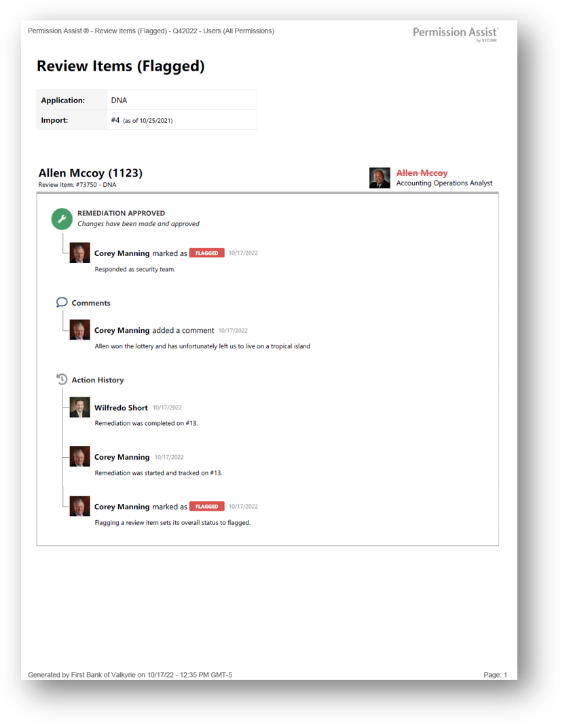
Flagged Review Items report
How to view or generate this report
Go to Reports > Reviews > Flagged.
The Flagged Review Items report is the focused view of every item a reviewer marked as a problem during a review. It includes both items currently in Flagged status and items that have moved on to Remediated — together, these are the items that required action beyond a simple approval.
Use this report when an auditor or regulator asks for the list of access issues surfaced by a review, or when the Security Team needs to confirm that every flagged item has either been resolved or is being tracked through a remediation access request.
When to use this report
- Audit response. When asked "What did this review catch?" — this report answers it with the full context (reviewer, action date, comments) for every problem item.
- Remediation tracking. Confirm that every flagged item has an associated remediation in progress or already completed.
- Trend analysis. Compare flagged-item counts across reviews to spot patterns (specific applications, specific reviewers, recurring privileges).
- Pre-close check. Before completing a review, the Security Team can use this report to confirm every flagged item has a path forward.
What this report includes
Every review item in the selected review whose overall status is Flagged or Remediated. Approved and Pending items are excluded — for those, see the All Review Items report.
Output formats
The report is exported from the Reports section of an open or completed review. Five export options are available:
| Format | Mode | Best for |
|---|---|---|
| Excel | Summary | A compact spreadsheet listing every flagged item, one row each. |
| Excel | Details | A spreadsheet with a full block per item, including the action history. |
| Excel | Flat | A single flat table with one row per action, suitable for filtering or pivoting. |
| Summary | A printable summary grouped by application, one row per item. | |
| Details | A printable, per-item PDF with each item's full action history. |
Section structure and columns
The output structure, modes, and column layouts are identical to the All Review Items report — the only difference is the filter (this report shows only Flagged and Remediated items). See that page's Excel — Summary, Excel — Details, Excel — Flat, PDF — Summary, and PDF — Details sections for the full column reference.
Sample